
Before & After School Care
Supporting Families When It Matters Most
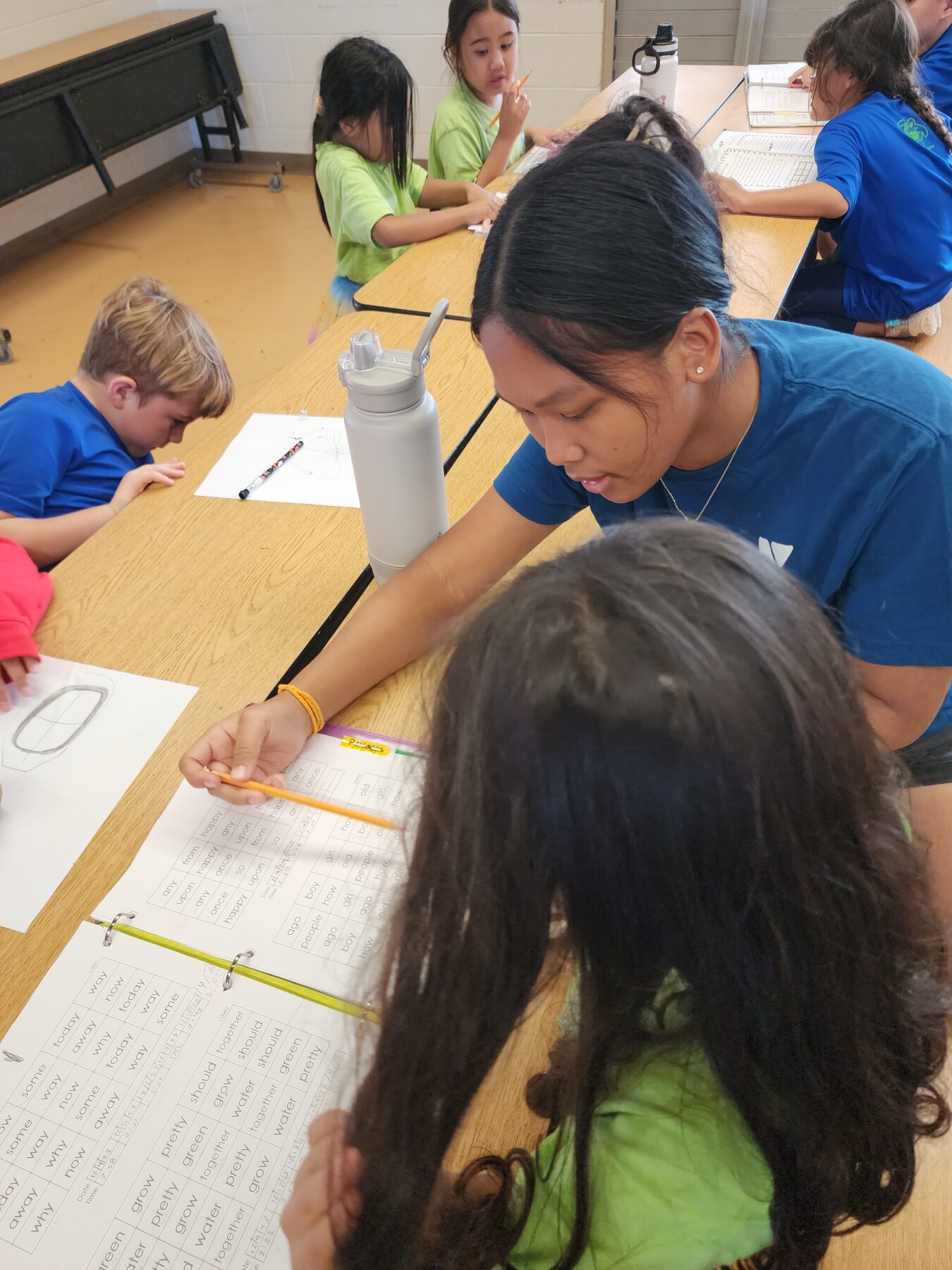
At the Maui Family YMCA, we know that the hours before and after school are just as important as what happens during the school day. That’s why we provide licensed, high-quality care for children in grades K–5 through our A+ Afterschool Program, offered in partnership with the Hawaiʻi Department of Education.
Our programs are safe, supportive, and designed to keep kids engaged, active, and connected to their peers while parents finish their workday with peace of mind. We currently operate after school programs at the following locations: Haʻikū Elementary, Kīhei Elementary, Lihikai Elementary, Pāʻia Elementary, Pōmaikaʻi Elementary, & Puʻu Kukui Elementary.
What is the After School Plus (A+) Program?
The A+ Programs were developed by the Hawaii State Legislature to reduce the incidence of latchkey children in the after-school hours. Therefore, all A+ programs must qualify students based on the definition of “latchkey” which refers to children who have no adult present in the home to provide after-school supervision. Parents/guardians must meet the following A+ Eligibility criteria to participate:
- School age students (grades Kindergarten to 6 grade) attending a public elementary school while participating in the A+ program.
- Parent/legal guardian(s) who participates in any of the following activities DURING A+ Operation Hours:
- Employed (have a job or are self-employed)
- Attend school (college, university, or other types of schools)
- Engaged in job training
- Work for the A+ program
- Provide written documentation to verify employment and/or attendance in school or training programs for each parent/guardian. All documentation must verify that these activities take place during A+ Operation hours.
Program Costs
2026/2027 School Year
- $240 per month per child
- Subsidies available. See the Subsidizing Monthly Fees section below for more information.
Program Registration Process
- Find the school your child(ren) will attend for the school year under the Maui Family YMCA A+ Program Registration section below and select the REGISTER button
- Fill out the online registration form as completely as possible
- HINT: Select the prompts at the top of the form for assistance in completing all required fields
- On a desktop computer:
- On a mobile device:

- On a desktop computer:
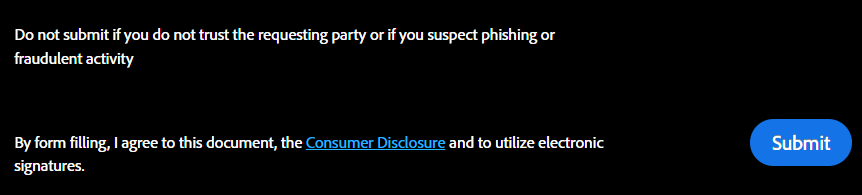
- Once all required fields are completed, a Submit/Finish button will display to finalize your registration (This button will NOT show if there are still required fields left)
- On a desktop computer as a pop-up on the bottom of the screen:
- On a mobile device in the top bar:

- On a desktop computer as a pop-up on the bottom of the screen:
- HINT: Select the prompts at the top of the form for assistance in completing all required fields
- Need assistance with paying the monthly fees? See the Subsidizing Monthly Fees section below for more information.
- IMPORTANT: Don’t forget to complete the Application for Subsidized Monthly Fee at the bottom of the registration form if you are interested in applying
- PAYMENT COLLECTION: All payments will be handled through our Online Payment Portal. Please make sure you have created and/or gained access to your Online Account. See the Online Payment Instructions section below for further guidance.
- Instructions for setting up Auto-Payments will be sent along with your confirmation email when your application has been approved.
- FOR 2026/2027 SCHOOL YEAR: Applications will not be processed until mid-July. You will receive a confirmation email at that time when your application has been successfully processed and your child(ren) are approved for our program.

Online Payment Instructions
All payments made towards our Afterschool Plus Program must be paid in-person at 250 Kanaloa Ave, Kahului, HI, 96732 or online via our Online Payment Portal. Paying online gives you the option to make a One-Time Payment or Set Up Auto-Payments that will automatically charge the monthly fee every 2nd of each month. Select the plus sign next to the online payment option below you are interested in to see detailed instructions. Please Note: In-person and One-Time payments must be made by the 1st school day of each month or late fees will apply thereafter.
- Select the SETUP AUTO-PAYMENTS button below to access the login page and enter your email address or phone number.
- IMPORTANT: You must enter the email address or phone number that you notated on your registration application.
- If this is your first time accessing your online account, it will go through the password creation process for you. If you have forgotten your password, you can also request to reset it or use a one-time code to log in instead.
- If the button below gives you any issues, you can also access this page via your online Dashboard at: operations.daxko.com/Online/5442/MembershipV2/MyAccountV2.mvc and selecting any of the numbers located under the Billing section:
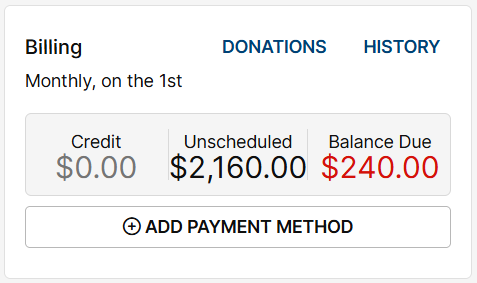
- For all future months, you can select the SCHEDULE PAYMENTS button in the upper right corner of the My Balance screen to complete the Setting Up Auto-Payments process.

- For any past due or current months, you will need to follow the Making a One-Time Payment process via the blue PAY BALANCE button to process an immediate payment.

- For all future months, you can select the SCHEDULE PAYMENTS button in the upper right corner of the My Balance screen to complete the Setting Up Auto-Payments process.
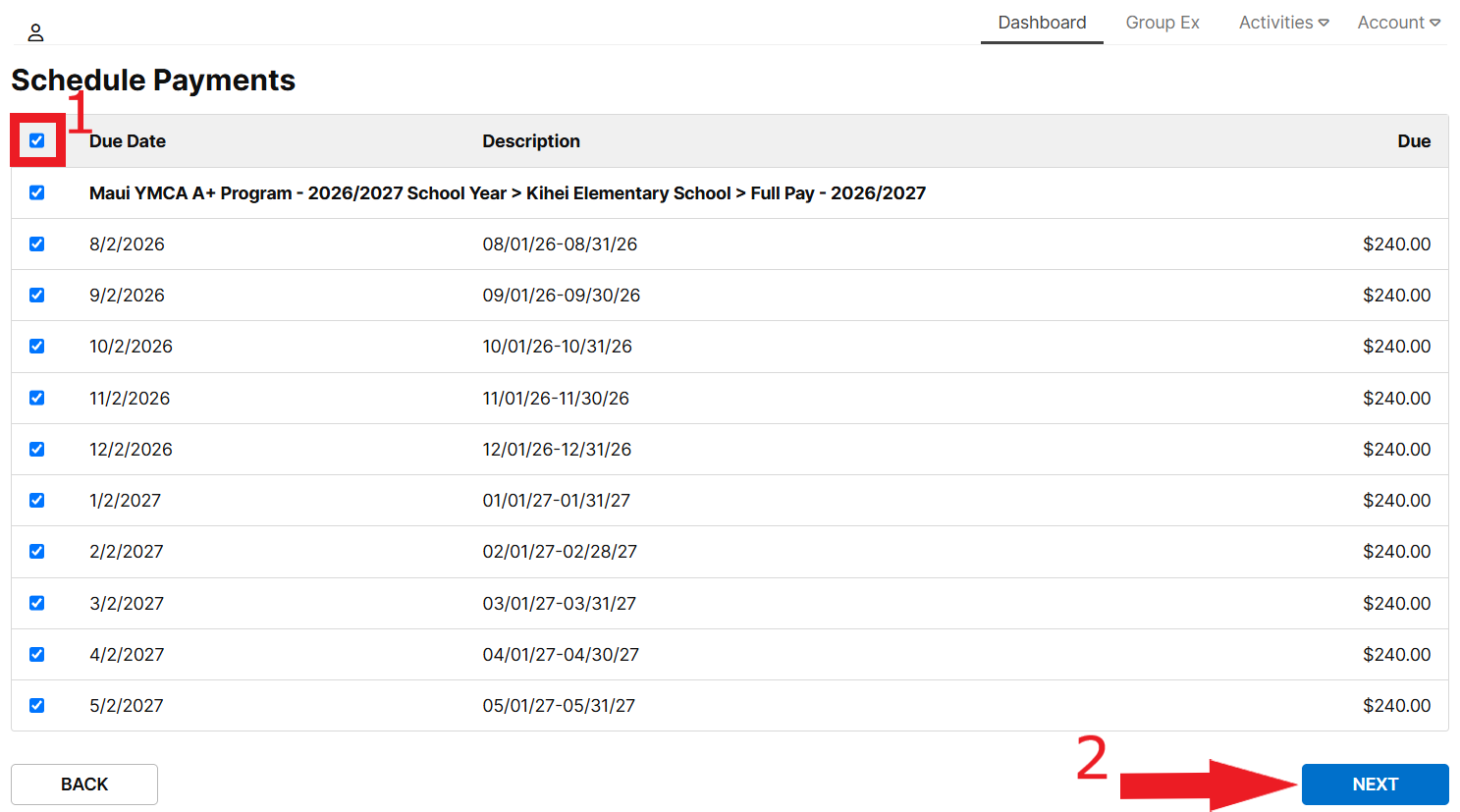
- On the Schedule Payments screen, select the topmost Checkbox to select all months for all children at once and then select the NEXT button.
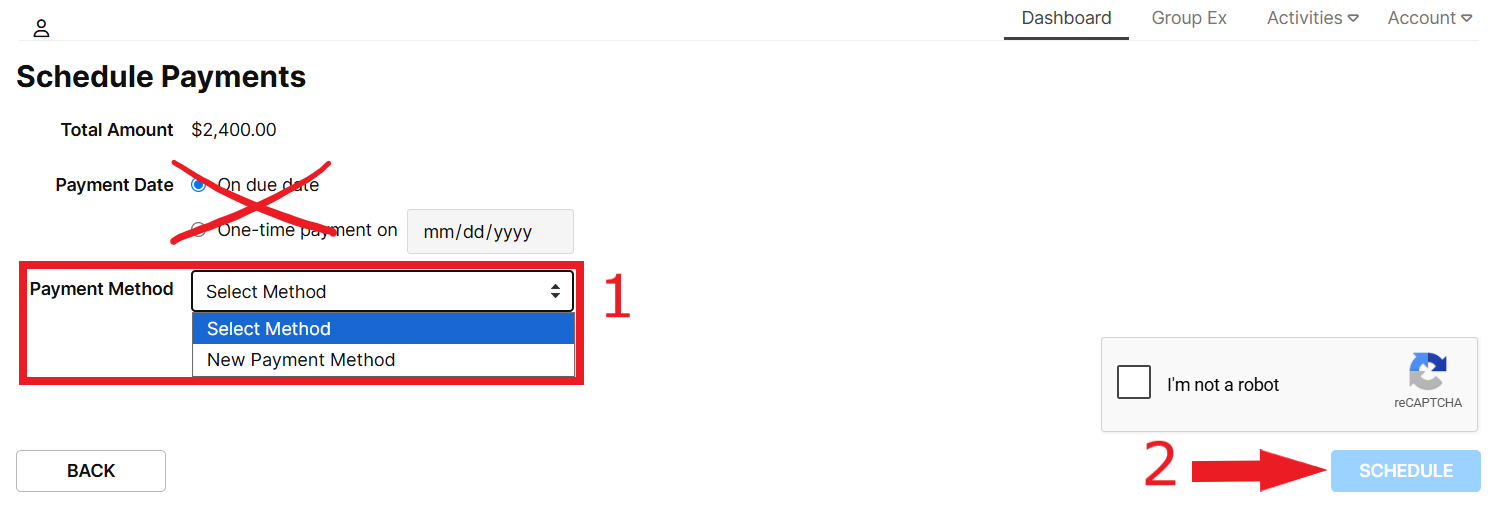
- On the next page, select an existing Payment Method or select New Payment Method if you wish to use another payment method instead.
- DO NOT CHANGE THE PAYMENT DATE. Please leave On due date selected to ensure that you are charged properly each month.
- DO NOT CHANGE THE PAYMENT DATE. Please leave On due date selected to ensure that you are charged properly each month.
- Once the correct payment method has been selected, confirm that you are not a robot, and select the SCHEDULE button to complete the Auto-Pay setup process.
REMINDER: One-time payments must be made by the 1st school day of each month or late fees will apply thereafter.
- Select the MAKE ONE-TIME PAYMENT button below to access the login page and enter your email address or phone number.
- IMPORTANT: You must enter the email address or phone number that you notated on your registration application.
- If this is your first time accessing your online account, it will go through the password creation process for you. If you have forgotten your password, you can also request to reset it or use a one-time code to log in instead.
- Once logged in, select the PAY BALANCE button in the upper right hand corner of the screen.

- Select the checkbox next to the fee you wish to pay for with this transaction and then select the NEXT button.
- Please Note: Any past due balances will be automatically selected on this page.
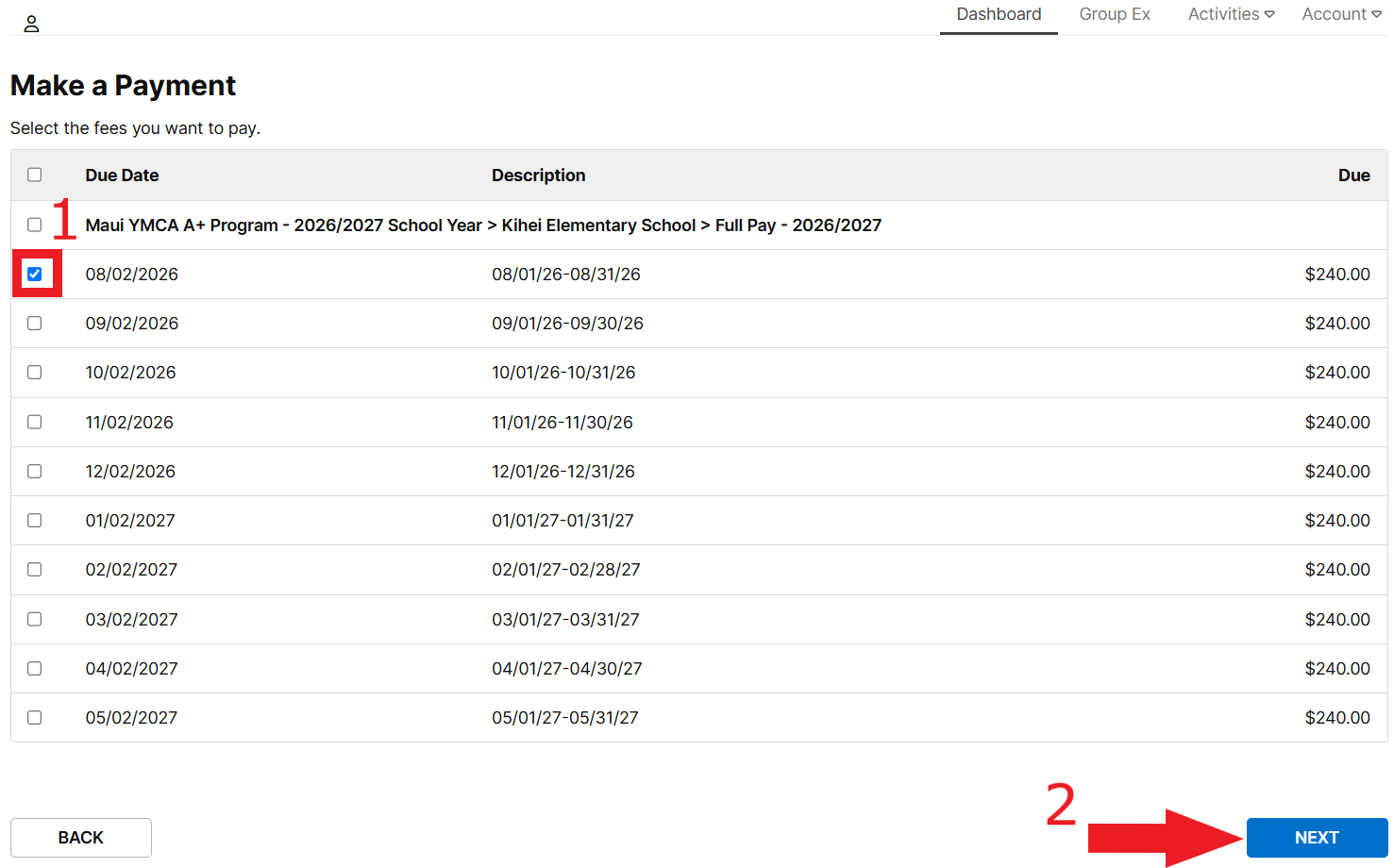
- Please Note: Any past due balances will be automatically selected on this page.
- On the Make a Payment screen, either select an existing Payment Method or New Payment Method.
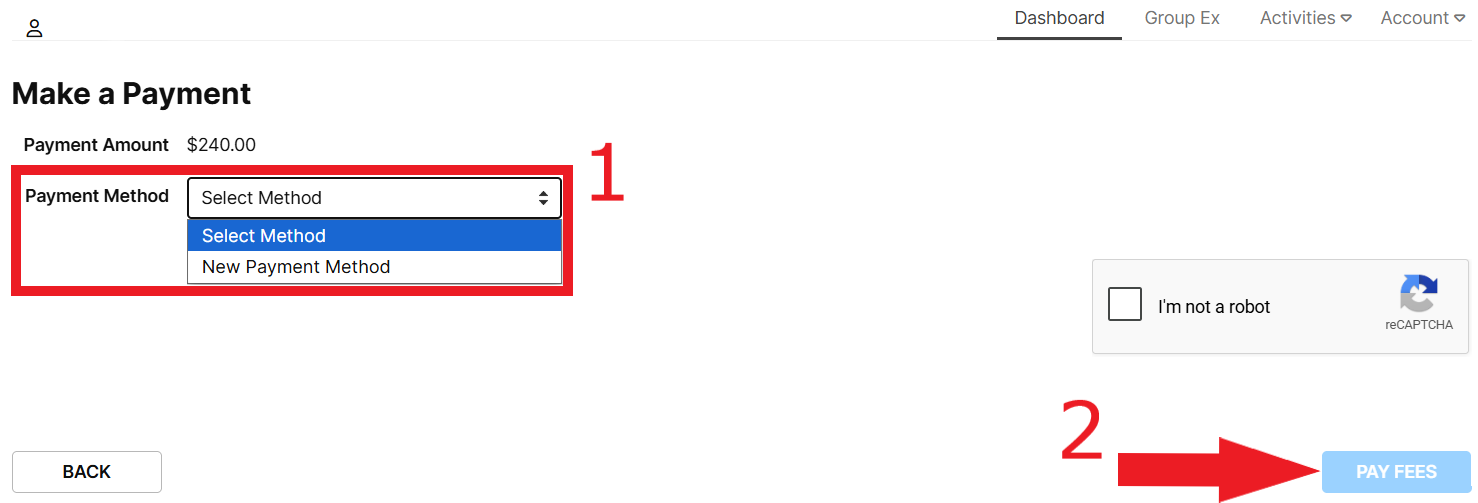
- With a payment method selected, confirm you are not a robot, and then select the PAY FEES button to complete the transaction.
- Access your Online Dashboard here: operations.daxko.com/
Online/5442/MembershipV2/ MyAccountV2.mvc - Click or touch on the current payment method on file (indicated below in red with the banner “Used for upcoming payments” displayed next to it as well) located under the Billing section:
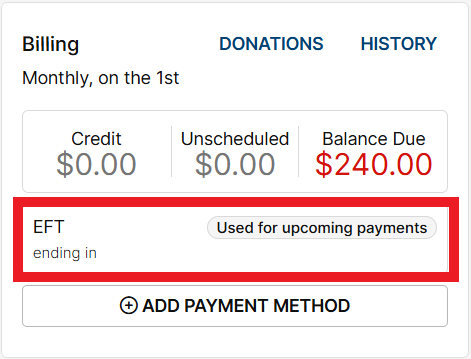
- Once the new payment method is entered, it should change all upcoming scheduled payments to the new payment method that you entered.
- Feel free to email us at info@mauiymca.org to double-check if the process was completed successfully!
Need Assistance? Please email us at info@mauiymca.org with as much detail as possible concerning the issue you are encountering. Screenshots are welcome too!
Subsidizing Monthly Fees
Families who need financial assistance can qualify for subsidies from the State of Hawaii Department of Human Services (DHS). Families must meet the following criteria to apply: Meet A+ Latchkey eligibility requirements (see above) & Meet DHS Income Eligibility requirements (Select the SUBSIDY ELIGIBILITY CALCULATOR button below) and provide income documentation. Once approved, families will have ALL monthly fees covered for FREE!
- Not sure if you would qualify for Subsidized Monthly Fees? Select the SUBSIDY ELIGIBILITY CALCULATOR button below to find out!
- Please note: qualifying on the Subsidy Eligibility Calculator does NOT guarantee approval
- If you find that you successfully qualify, don’t forget to complete the Application for Subsidized Monthly Fee at the bottom of the Registration Application.
- IMPORTANT: You must also upload financial documents (see bottom of application for more details)
- When processed, an email will be sent to notify you if your application has been approved or rejected. You may reach out to the Site Coordinator via the email addresses below for any status updates.
Already completed your application but now want to apply for Subsidized Monthly Fees? Select the STANDALONE SUBSIDY APPLICATION button under the appropriate school below!
Additional Financial Assistance
Maui Family YMCA A+ Program Registration
2026/2027 School Year
- Access your Online Dashboard here: operations.daxko.com/
Online/5442/MembershipV2/ MyAccountV2.mvc - On your Online Dashboard, select HISTORY located under the Billing section as seen below:
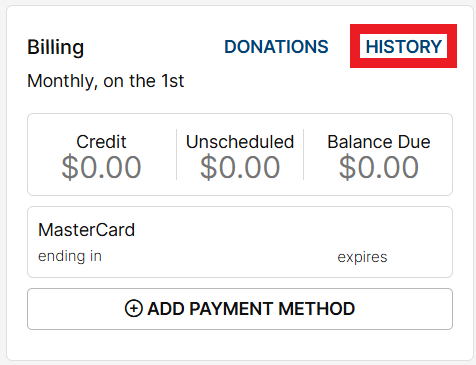
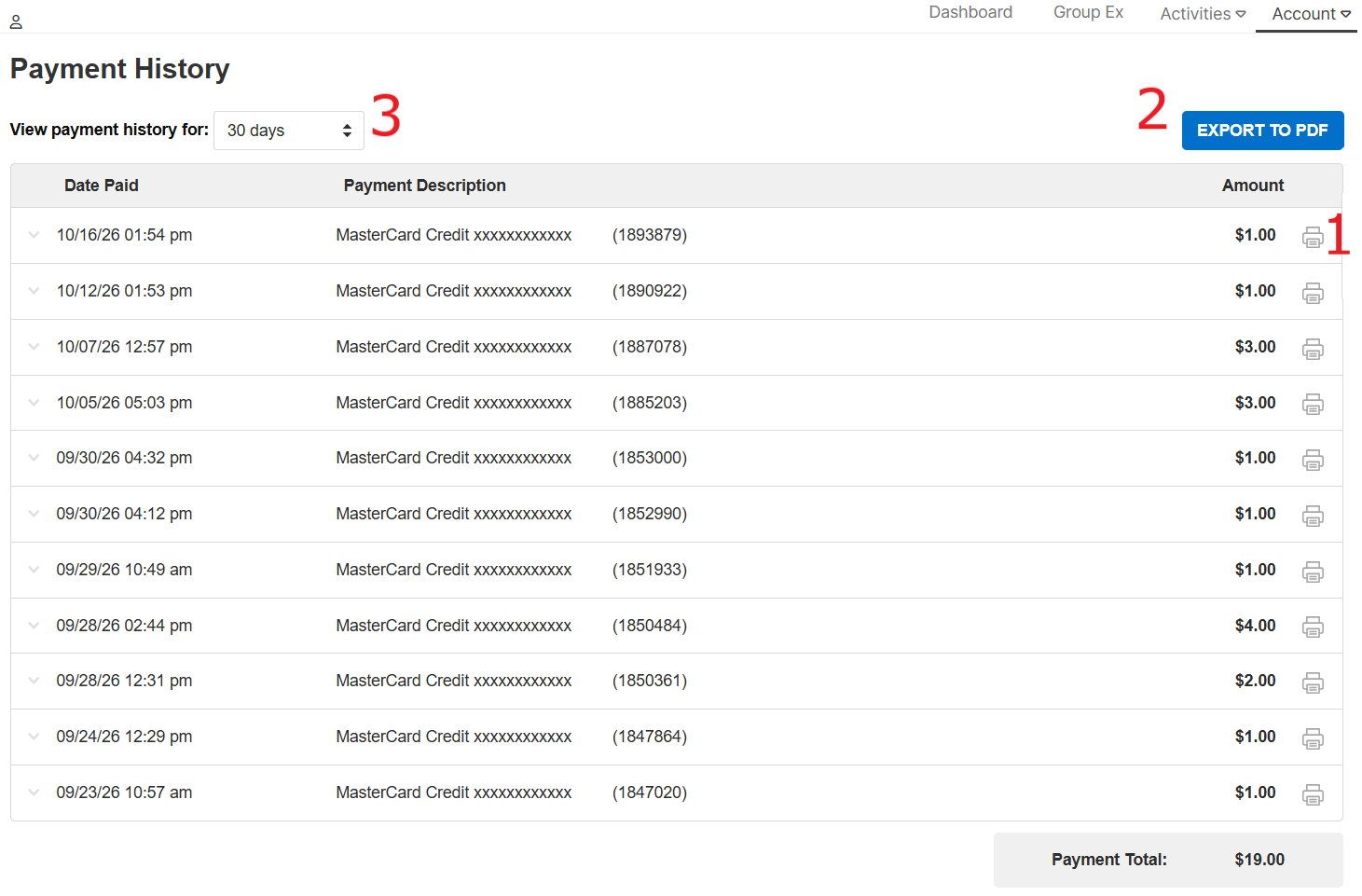
- On the Payment History screen, you have the option to (1) print out each receipt by selecting the print icon, (2) export your entire payment history by selecting the EXPORT TO PDF button, and (3) select the time frame to view past payment history:
Need Assistance?
- For enrollment status or after-enrollment inquiries, please contact the Site Coordinator via the email or phone number listed above
- For IT Assistance, please email us with as much detail as possible to info@mauiymca.org
- For any other inquiries, please feel free to reach out to our Director of Youth Development, Brando, at brandon@mauiymca.org